
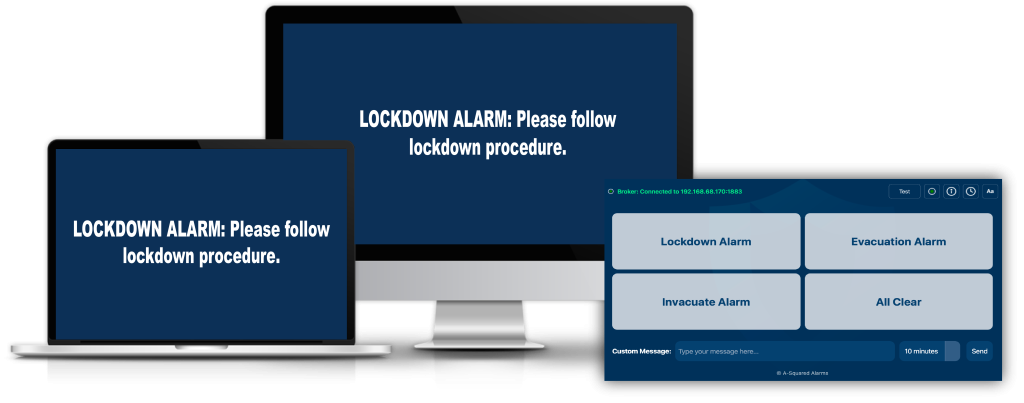






In an emergency, clarity saves time — and time saves lives.
PopAlert’s core features are designed to deliver unmistakable visual and audible alerts, tailored to different scenarios, and instantly visible on screens across your site. No confusion. No delay. Just clear communication when it matters most.
PopAlert allows alert screens to remain visible for a configurable duration, ensuring messages stay on screen for as long as needed.
This helps prevent alerts being missed during busy or disruptive situations and ensures consistent visibility across all devices.
Predefined alert buttons can be configured with clear, scenario-specific text.
This ensures messages are consistent, approved, and immediately available during an emergency.
Authorised staff trigger alerts using predefined options, reducing the risk of unclear or rushed messaging.
During an active incident, administrators can send live custom updates to all connected devices.
This allows instructions to be adjusted as more information becomes available.
PopAlert includes a library of 32 built-in sirens and alert tones, allowing organisations to select a single alert sound that is clearly distinguishable from existing fire alarms.
By using a dedicated alert tone, PopAlert helps occupants immediately recognise that the alert is not a fire alarm and respond appropriately to the situation.
PopAlert runs quietly in the background on connected devices, ensuring alerts can be displayed instantly when triggered.
There is no need for users to open or interact with the software for it to function.
When triggered, PopAlert displays alerts in full-screen mode, ensuring instructions are immediately visible and not hidden behind other applications.